

Find places near you with Explore
Explore is the discovery screen. It works without an account.
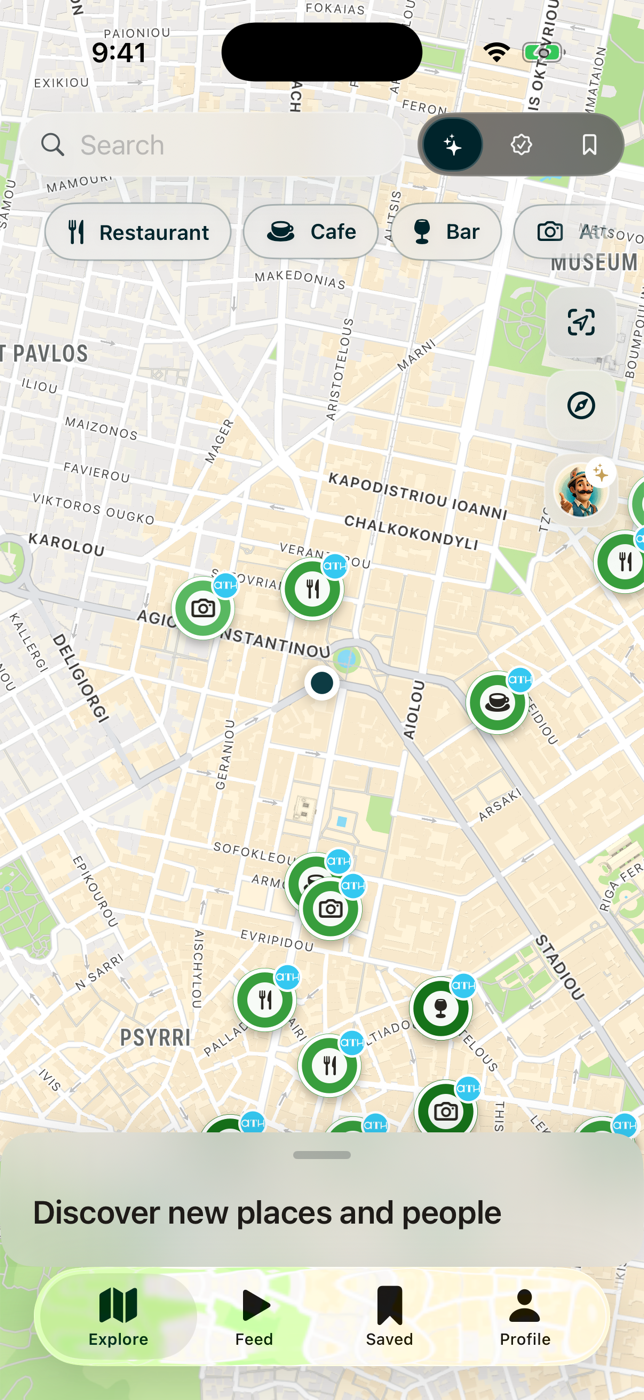
Nearby: places around you
Section titled “Nearby: places around you”Explore opens on a map of real places, such as cafes, bars, viewpoints, and beaches, that creators recommend near you. Each pin is one place, not one map for sale.
- Pin color is the visit priority the creator gave the place: darker green for must-see, lighter for if-you-have-time.
- The small circle in the center shows the category.
- The badge on top is the creator who recommended it. When several creators recommend the same place, their badges cluster.
- Category filters run along the top of the map. Tap one to narrow what shows.
- Below the map, Places near you and Popular creators rows let you scroll through picks and the people behind them.
If you have not shared your location, Explore centers on a preview city and says so. It never presents preview content as if it were nearby.
Zoomed all the way out
Section titled “Zoomed all the way out”Past city zoom, crowded areas gather into count bubbles instead of a wall of pins. Tap a bubble to zoom toward it.
Choose whose places you see
Section titled “Choose whose places you see”The picker sits above the category filters. Trusted and Saved follow the map: pan to another city and they answer for that city.
Browse: travel by destination
Section titled “Browse: travel by destination”Switch Explore to Browse to go continent, then country, then that country’s maps. A search field across the top searches every destination, creator, and map by name.
Tapping a place
Section titled “Tapping a place”Opens the place card: category and priority, the place name, the creator’s note, and any photo or video that featured it. On mobile you can also get directions, add it to one of your maps, share it, or open the creator’s page.